This is part 2 of the Apple GPU Driver series.
Goal
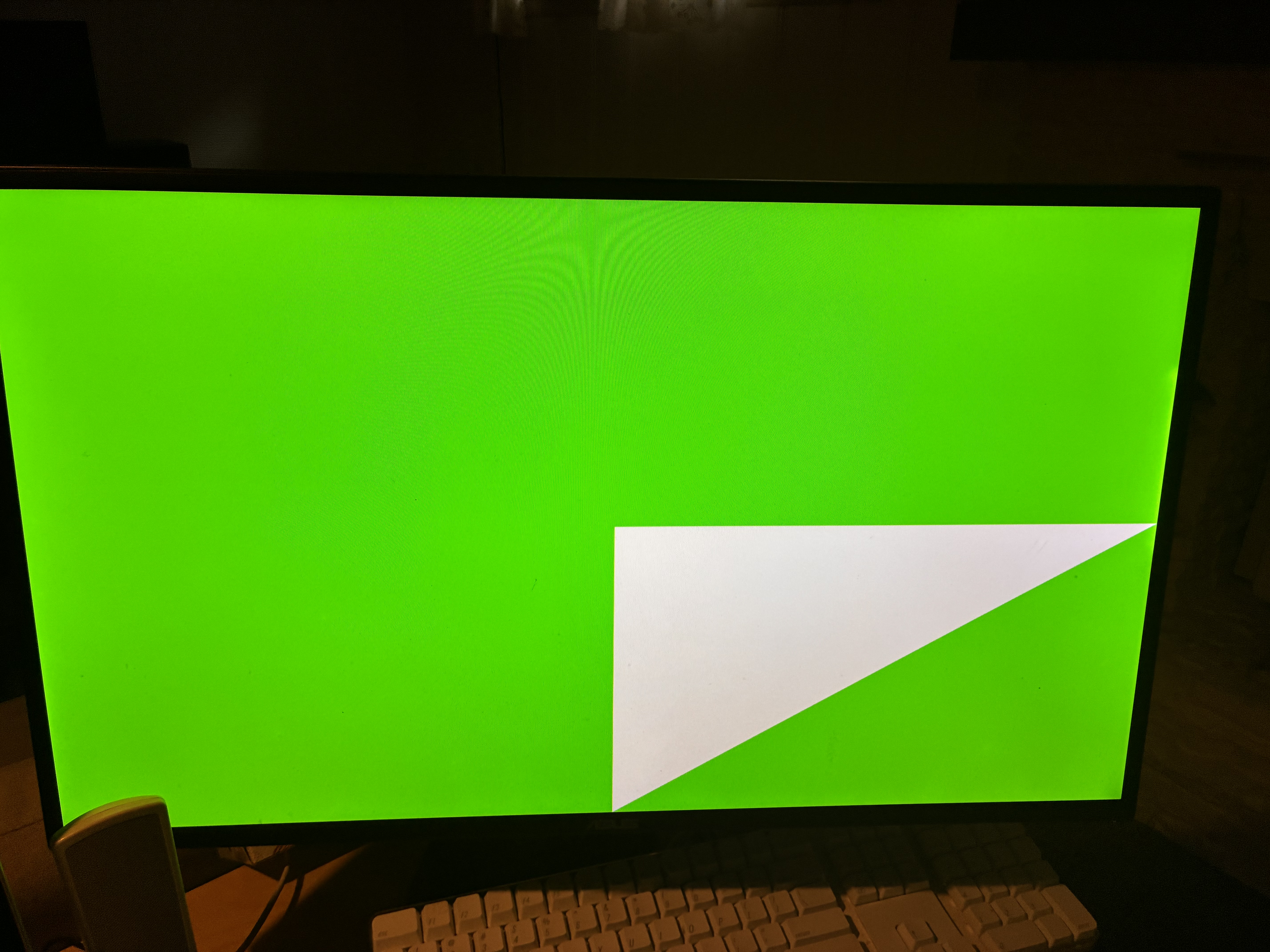
The goal of this post is to finally get a triangle rendered in our Apple GPU driver! If you haven’t read the previous post in this series, you probably should because it contains quite a bit of background info. Read it here.
This is the render pass I’ll be using for this post:
GpuCommandBuffer cmd = gpuStartCommandRecording(state.nogfx.queue);

gpuBeginRenderPass(cmd, (GpuRenderPassDesc) {
    .colorTargets = {
        { .texture = state.nogfx.render_target, .loadOp = CLEAR, .storeOp = STORE, .clearColor = { 0, 1, 0, 0 } },
    },
});

gpuSetPipeline(cmd, state.pipeline);
gpuDraw(cmd, NULL, NULL, 3, 1);

gpuEndRenderPass(cmd);

gpuSubmitSimple(state.nogfx.queue, &cmd, 1);
Shader Compilation
The first step was getting shader compilation working. Mesa has a shader intermediate language called NIR. libagx does most of the heavy lifiting by compiling NIR into AGX machine code.
My job is lowering IO operations and intrinsics, and linking shaders. IO operations consist of accessing uniform and storage buffer data, accessing varying data, descriptor sets, etc. There’s a wide range of intrinsic operations, some of them are related to IO operations, but there are many others. An important intrinsic used by the shaders used later in this provides access to system values, such as the current vertex index (gl_VertexIndex).
In AGX, uniforms are the fundamental way to pass data to the shader program. Uniform slots are supplied with a GPU pointer on the CPU side, then the shader program can access that data and do whatever it wants with it. In the Honeykrisp (Vulkan) driver, uniforms are used to pass the root descriptor table, blending data, VBOs, vertex attribute data, vertex base parameters and more. It’s important to note that the hardware doesn’t care what the uniform data represents, it’s the driver determines how the data is used. libagx defines the ABI it uses for uniform data placement, but we’ll most likely be using our own ABI for nogfxapi (since, for example, nogfxapi doesn’t have the concept of VBOs).
The NIR api let’s us run passes over a given shader program. We can use these passes to pretty much do anything: introspect the shader, rewrite code, optimize code, etc. Mesa provides a bunch of common passes that we might want to run, but we’ll also define our own passes.
I copied most of the NIR compilation and linking code from the Honeykrisp driver, then stripped a lot of it down to what I needed. In the theme of doing the simplest thing possible, I handle almost no IO operations. I’m not passing any uniform data, nor handling varyings.
Shaders
The test shaders I’m using are very simple. They’re written in GLSL for now, as it’ll be fine for testing this simple functionality. In a future post I’ll switch to using a custom shading language compiler better suited for nogfxapi.
The vertex shader is this:
void main() {
    gl_Position = vec4(gl_VertexIndex & 1, gl_VertexIndex >> 1, 0, 1);
}
And the fragment shader is this:
layout(location = 0) out vec4 o_frag_color;
void main() {
    o_frag_color = vec4(1, 1, 1, 1);
}
The vertex shader uses a simple trick to generate vertices for a triangle without using vertex buffers.
Linking
Linking is required since some data needs to be baked into the shader program at draw time (so-called dynamic state). We don’t want to compile the entire shader for each draw call, so we link in prologs and epilogs, small pieces of code inserted before and after the actual shader program. The vertex shader for example uses a prolog to load vertex attributes and buffers (I believe this is so the uniform location can change without having to modify the actual shader). We also need to link up varying slots from the vertex shader to the fragment shader (but I’m not quite sure how that works yet, we’ll see in a later post).
I compile and link shaders each draw call, but later we’ll need a way to cache this. Since I’m only doing one draw call right now, it doesn’t matter.
Graphics State
Before recording a draw call into the graphics control stream, we need to push all the relevant graphics state. The graphics state contains everything we need to render, such as shader pipeline info, viewports, primitive topology, front face/back face, culling info, depth/stencil info, and more. The state is broken up into related chunks that can be emitted independently. For example, cull state and viewport state are pushed separately like this:
agx_ppp_push(&ppp, CULL, cfg) {
    cfg.cull_front = pipeline->raster.cull_front;
    cfg.cull_back = pipeline->raster.cull_back;
    cfg.front_face_ccw = pipeline->raster.front_face_ccw;
};

agx_ppp_push(&ppp, VIEWPORT, cfg) {
    cfg.translate_x = 2560 / 2;
    cfg.translate_y = 1440 / 2;
    cfg.translate_z = 0;

    cfg.scale_x = 2560 / 2;
    cfg.scale_y = 1440 / 2;
    cfg.scale_z = 1;
}
This lets us conditionally emit state, meaning we can track dirty state and only emit the state that’s changed. For now I simply push all the required state and don’t track dirty state at all.
After emitting all the graphics state, I call agx_vdm_draw which inserts commands into the control stream to actually start drawing. This is given the vertex count/index count, instance count, base vertex data, etc.
Fixing crashes
After trying to submit the control stream with all the graphics state and draw commands to the queue, the GPU faulted:
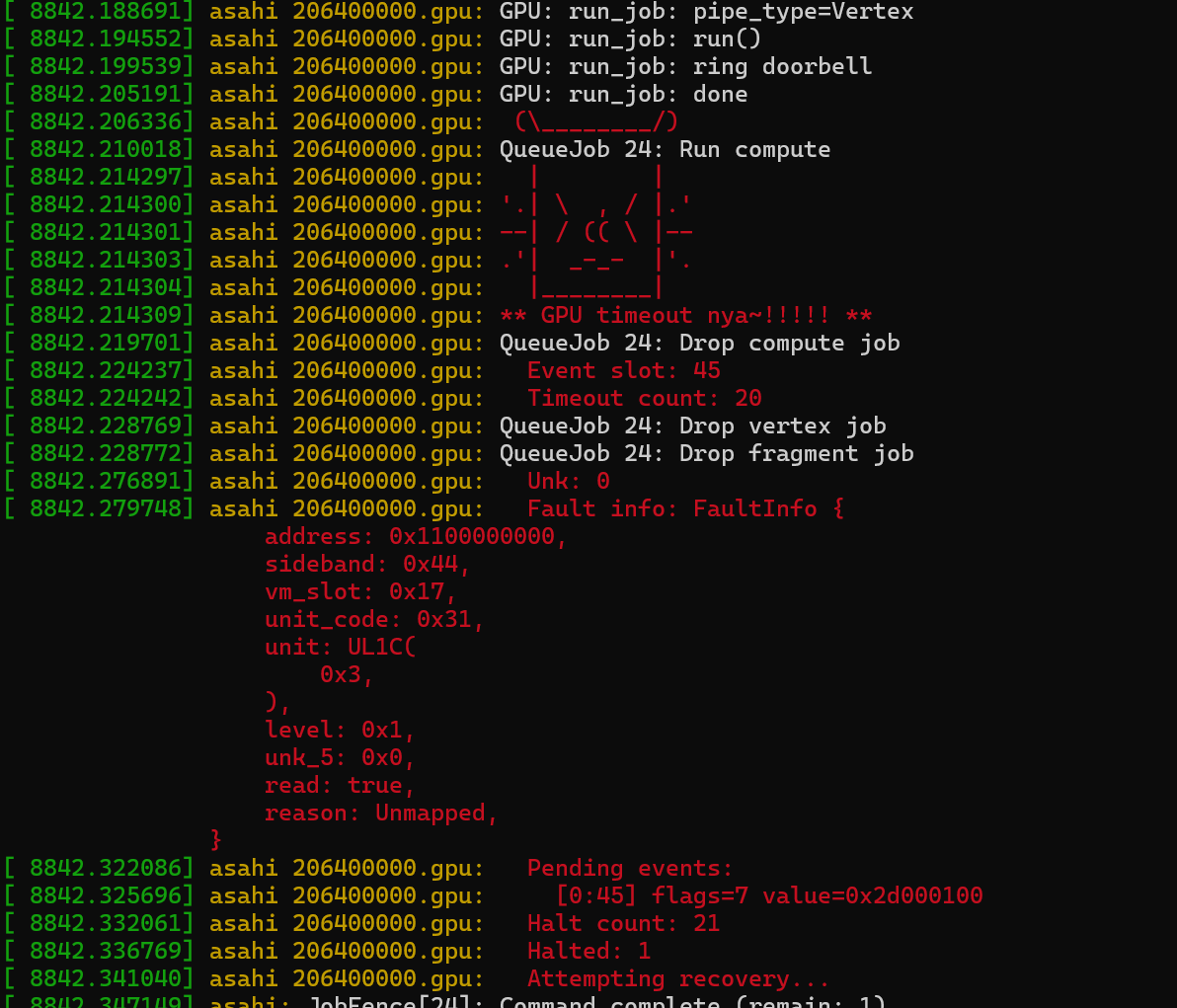
As you can see, it faulted in the UL1C (Uniform Level 1 Cache) unit, with an unmapped address 0x1100000000. At first, I thought it was an issue with the vertex shader reading gl_VertexIndex, as the compiled shader machine code was using a register r5 marked as cached (wasn’t quite sure what that meant), but then I realized the fault message was referencing the fragment shader.
I noticed that the unmapped address was actually the shader base address, i.e. the base address of the Unified Shader Core (USC) unit (the USC is the thing that actually runs the shaders). The USC uses addresses relative to its base address, so I suspected this was essentially a null pointer access.
I combed through the graphics state trying to find any fields that looked like addresses I was setting to zero, but couldn’t find anything. Then, I looked at the DRM submission IOCTL. There were a lot of pointer looking fields that I was setting to 0. I started assigning values to each of the fields with easy to spot consecutive numbers. E.g. field 1 got value 1, field 2 got value 2. The goal was to spot if the unmapped address in the fault would change.
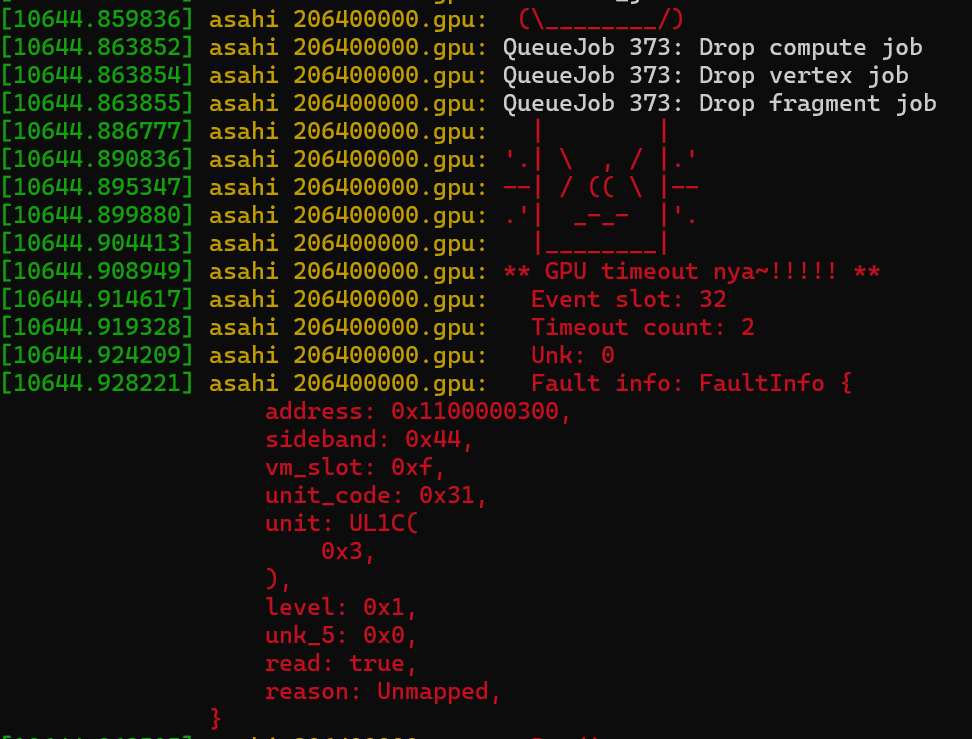
bg.usc… I’ll explain further
Tiled Rendering
This is a very important property of the AGX architecture that I was pretty much completely ignoring up to this point.
Tiled rendering is where the rendering area is divided up into fixed size tiles (say 32x32 pixels), then each tile is processed individually with its own fast cache. It’s popular in mobile GPUs as it reduces memory bandwidth which should lead to lower power consumption.
Anyways, even though my Mac Mini is not a mobile device, the AGX architecture originated on Apple’s mobile devices, so my M1 GPU is tile based as well.
There’s an intermediate pixel buffer called the “tilebuffer”. This tilebuffer is allocated by the kernel driver, and is probably not a linear buffer in memory (but I’m not sure about that). The fragment program will write into the tilebuffer, then later the tilebuffer contents will be writen out to the actual render target.
The tilebuffer needs to cleared acoording to the color attachment load operation before the fragment shader can write to it. This is what the bg.usc field that was faulting earlier is for (bg for background). It contains an address to a shader program that implements that load operation logic. The GPU was trying to run this bg shader but ended up trying to execute an unmapped page (null pointer), so it crashed.
There’s also an eot shader (End of Tile I believe). It runs after the fragment shader has completed and is responsible for transferring the tilebuffer contents to the render target.
I used libagx to initialize the tilebuffer properly, and to create the bg and eot programs. After doing this, a blocky triangle appeared on the screen!
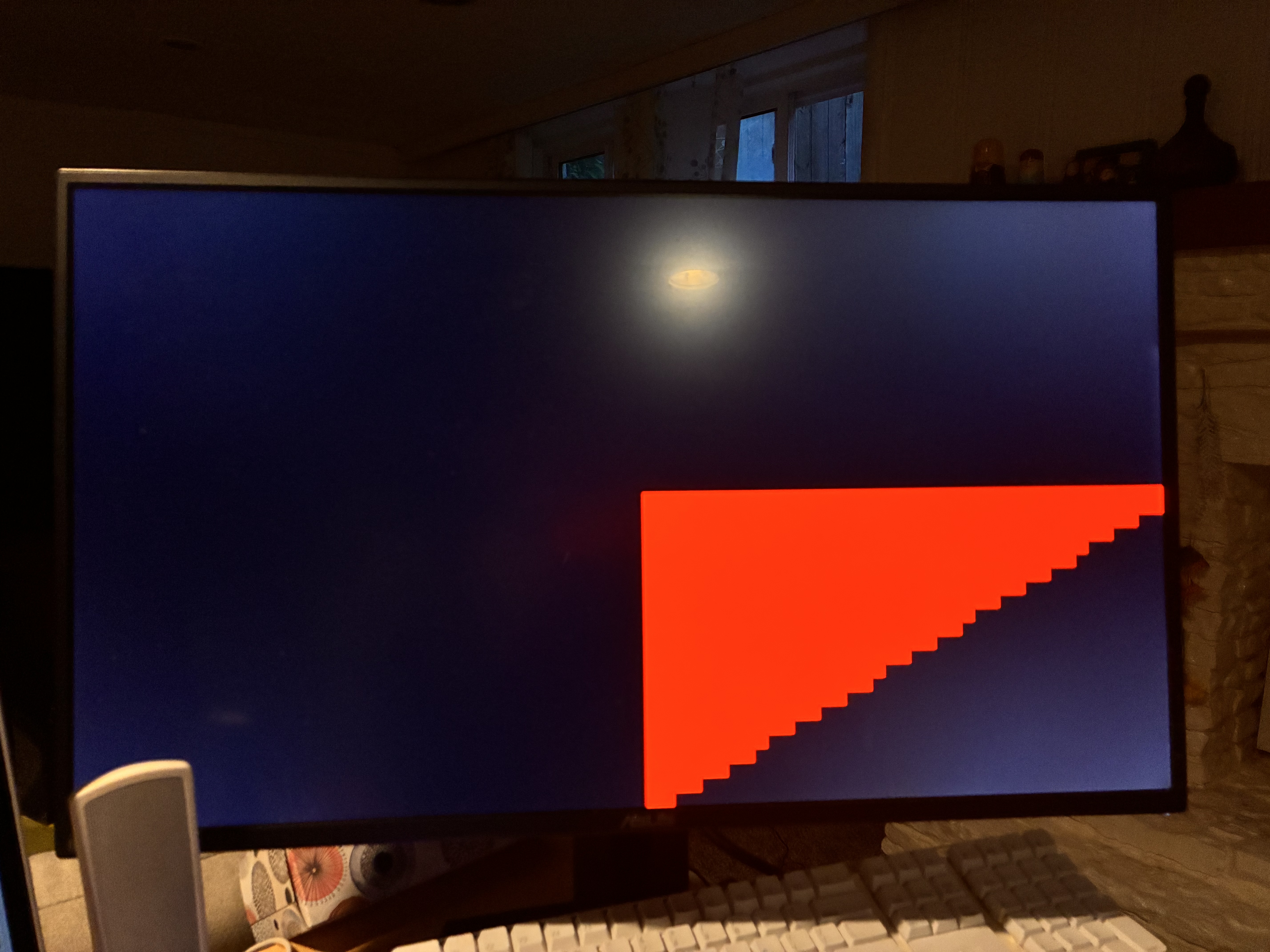
Of course, this isn’t quite right. The blockiness, along with knowing that the clear color was set to red, made it clear that we were seeing only the tiles being cleared but not the rendered triangle (the frag shader sets the triangle color to white). I realized the color mask was being set to 0 in the graphics state. After setting that to 0xF, the correct triangle appeared!
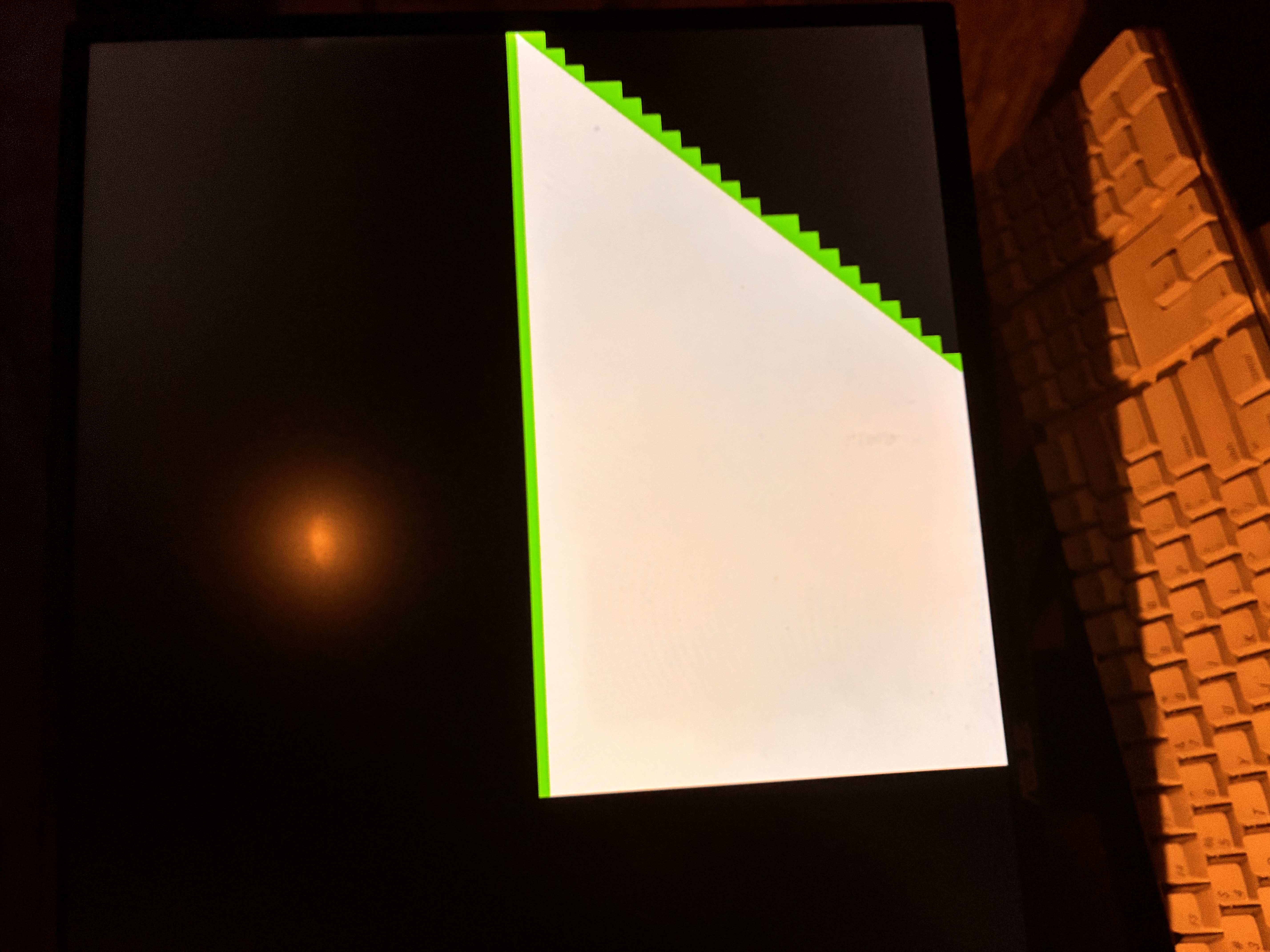
Note: in this image the vertex shader applied a 2x scale to the Y-axis
You can really see how the tiled rendering works here. First the bg program is run on all the affected tiles to clear the tile buffer. Then the actual triangle is written on top (actually I’m not sure if the bg_main program is run for completely covered tiles. I would hope not?).
Finishing up
Before starting the work for this post, I disabled the compute pipeline for clearing the color attachment from last time. I needed to do some work to support having both compute control streams and graphics control streams in a single command buffer, and to submit them at the same time. This included setting up proper barriers to ensure correct ordering of control streams. After getting that working, I dispatched the compute pipeline to clear the attachment before rendering, then added a barrier to ensure the graphics pipeline waited for the clear pass to complete. Not sure if this is optimal, but it works for now.